Chore Command Center for Busy Homes
Chores → Points → Real Rewards.
A beautiful, 100% private iPad app that makes family chores simple, fun, and actually get done — no sign-ups, no cloud, no subscriptions.
One-time purchase • Works offline forever • Perfect for families & roommates
See Chorish in Action
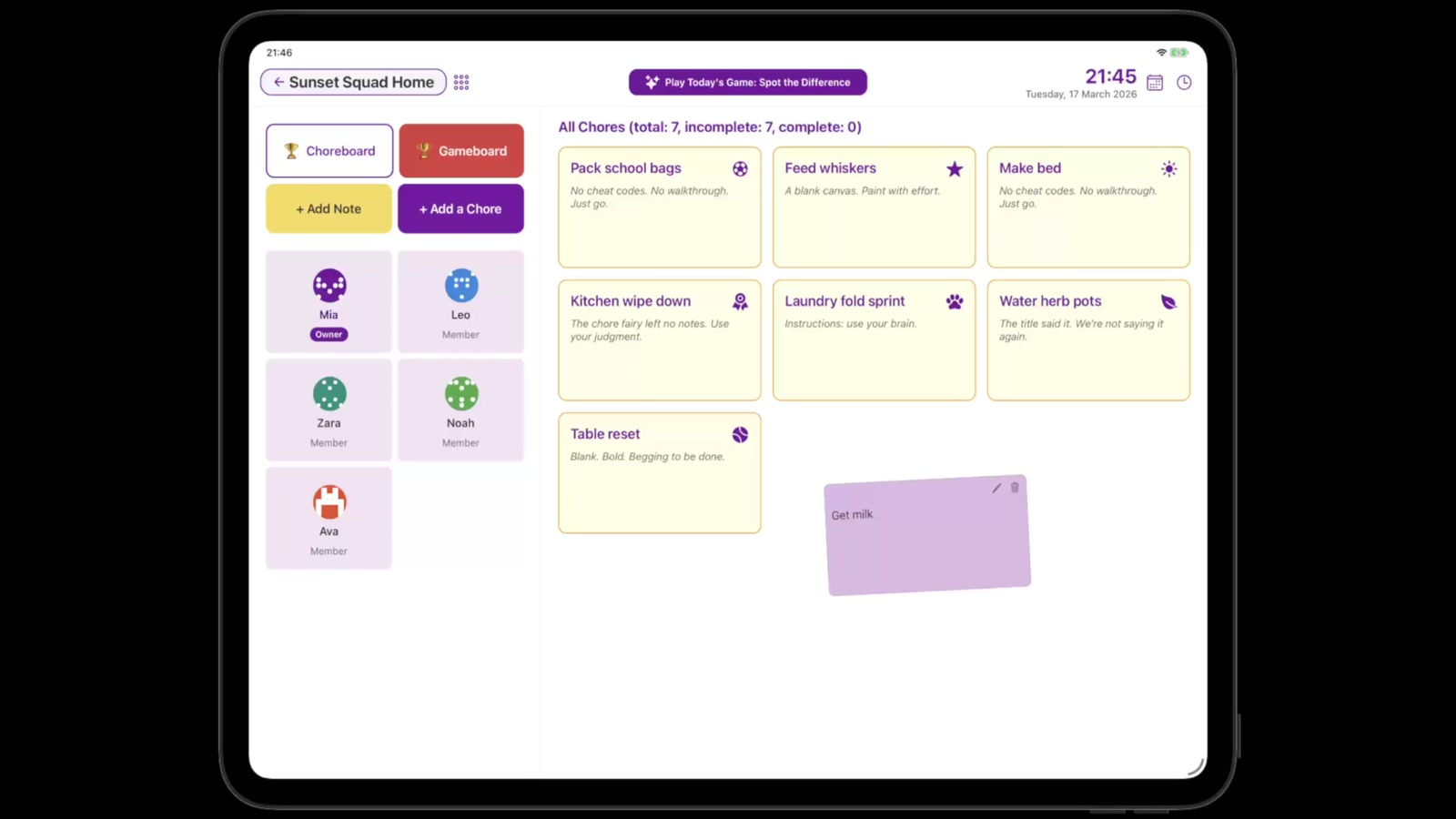
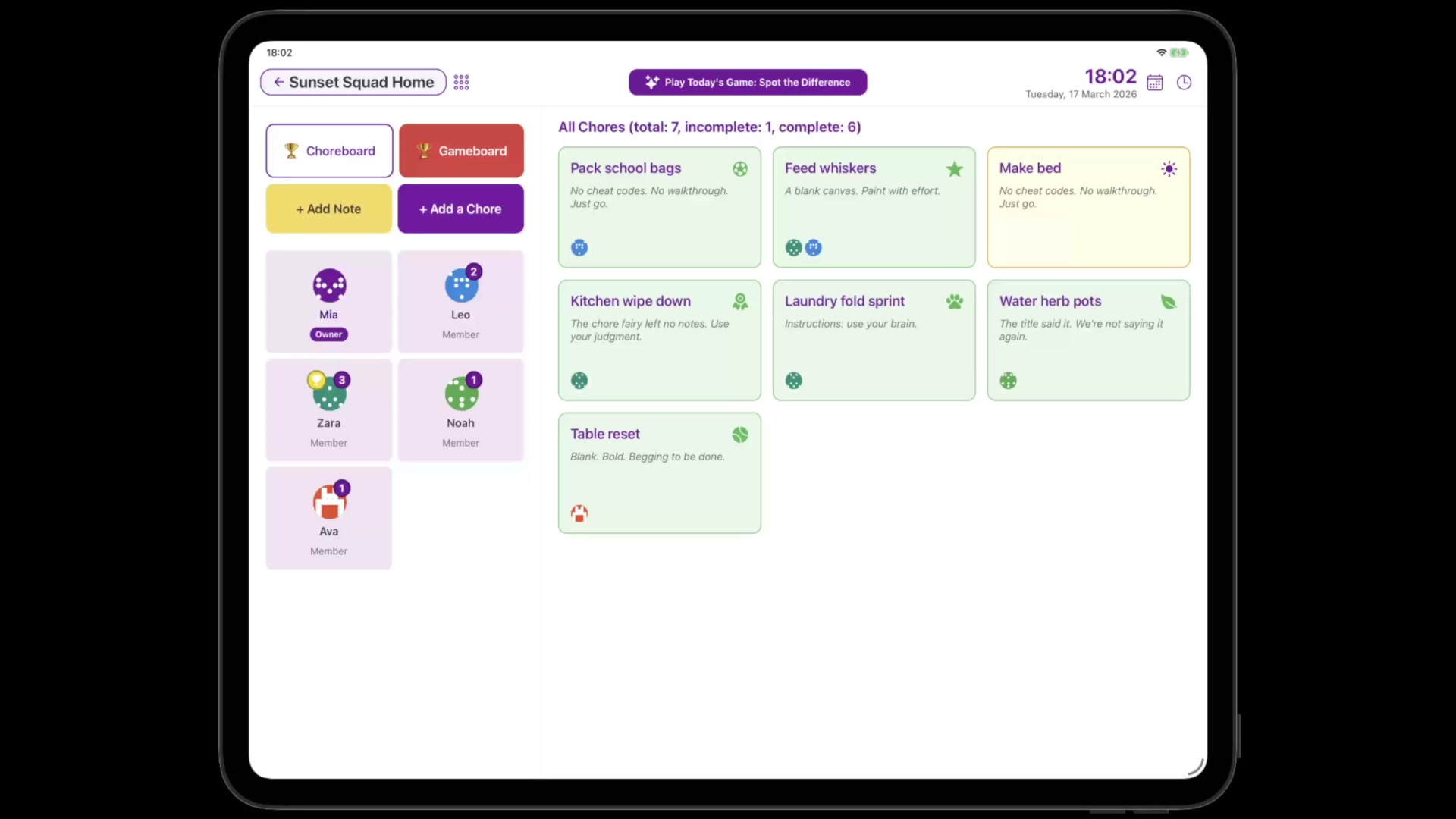
Two quick peeks at what Chorish actually feels like on your iPad—no actors, just chores turning into points and loot.
Marking chores done in seconds
See how quickly chores get ticked off—open chores or assigned ones—and turned into points.
From note to Choreboard to rewards
Add a note, peek at the Choreboard, open a member, and redeem a reward—all from one cosy command center.
Privacy First
All data stays on your iPad. No server storage or tracking.
No Sign-Ups
Open the app and start organizing. No accounts needed.
Made for Shared Spaces
Touch-optimized for the kitchen iPad or shared tablet.
How It Works
Create Your Home
Name your home and your command center is ready in seconds.
Add Your Crew
Invite up to 6 members—family, roommates, or teammates. Each gets their own avatar.
Start Completing
Tap to complete chores, earn points, and let Chore roulette break ties.
Everything You Need
Family
TopAll Together Now: Effortless Family & Housemate Management
Keeping a household running smoothly can be a challenge, especially when everyone has a different schedule and priorities. With Chorish, you can add your family, housemates, or even a small team to a shared dashboard where everyone can see what needs to be done, jump in on open chores—or follow assignments when someone’s clearly on point—and celebrate wins together.
Why Use Chorish for Your Family or Housemates?
- No More Confusion: Everyone knows exactly what needs doing, and when.
- Personalized Experience: Each person gets their own fun avatar and name, making the dashboard feel like home.
- Transparency: See at a glance who’s done what, and who’s next up for chore glory.
- Motivation: Friendly competition and clear progress help keep everyone engaged.
- No Sign-Ups: No accounts, no emails, no passwords—just open and go.
How It Works
- Invite Members: Add up to 6 people—perfect for families, flatmates, or small teams.
- Chores that fit how you actually run the house: Add daily tasks, leave some open for anyone to nab, assign members when clarity helps, or let Assign a chore roulette pick what’s still unassigned.
- Track Progress: As tasks are completed, everyone’s avatars light up with pride.
- Celebrate Success: View reports, see streaks, and maybe even reward the top chore champion!
Example Use Cases
- Families: Get kids involved in tidying up, feeding pets, or helping with dinner.
- Roommates: Fairly split cleaning, shopping, and bills—no more “I did it last time!” debates.
- Small Teams: Manage shared office duties or project tasks in a fun, visual way.
Did you know?
Studies show that clear, shared task lists reduce household stress and improve cooperation. Chorish makes it easy and even a little bit fun!
Frequently Asked Questions
Q: Can I use Chorish if my family isn’t tech-savvy?
A: Absolutely! Chorish is designed to be simple, touch-friendly, and optimized for iPad landscape mode.
Q: Is my data private?
A: 100%. All your data stays on your iPad—nothing is sent to a server.
Tip: Tap your avatar to start completing tasks and see your progress soar!
Games
TopPlayful Breaks: Mini-Games for the Whole Crew
Chores are important, but so is having a little fun! Chorish comes with a selection of quick, family-friendly games you can play right in the app. Whether you’re waiting for everyone to finish their tasks or just need a giggle, our games are the perfect way to lighten the mood.
Why Play Games in Chorish?
- Quick Fun: Each game is designed to be played in just a minute or two—perfect for a quick break.
- Family-Friendly: No downloads, no ads, just pure, wholesome fun for all ages.
- Built-In: No need to leave Chorish or install anything extra.
What Can You Play?
- Quick Quiz: Answer a random trivia question as fast as you can!
- Emoji Riddle: Guess the word or phrase from the emoji clues.
- Memory Flip: Match all the pairs before the time runs out.
- Reaction Test: Click as fast as you can when the button appears!
- Word Scramble: Unscramble the word before time runs out.
- Spot the Difference: Find the difference between two emoji grids.
Pro tip: Use games as a reward for finishing chores—or just to settle who does the dishes tonight!
Home
TopYour Private Chore HQ: Organize, Personalize, and Take Control
Every great team needs a home base—and with Chorish, your “home” is a private, customizable space for your family, housemates, or small team to manage chores, notes, and progress together. No more lost lists or forgotten tasks: everything you need is in one secure, easy-to-use iPad dashboard.
Why Set Up a Home in Chorish?
- Privacy First: Your home is 100% private—no sign-ups, no cloud, no tracking. All data stays on your iPad.
- Customizable: Add up to 6 members (owner + 5), each with their own fun avatar and name.
- Centralized Organization: Keep all your tasks, notes, and progress in one place on your iPad.
- Multiple Homes: Manage more than one home if you’re a multitasker (e.g., family, roommates, and a side project team).
How It Works
- Create a Home: Name your home and you’re ready to go.
- Add Members: Invite your crew—family, flatmates, or teammates. Each gets a unique avatar and spot on the dashboard.
- Manage Everything: Add chores—assign helpers when helpful or leave them open—plus notes and events. Switch between homes with a single tap.
- Stay in Control: Only the home owner can access management features, keeping things organized and secure.
Example Use Cases
- Families: Keep everyone on the same page for chores, events, and reminders.
- Roommates: Fairly split cleaning, shopping, and bills—no more confusion or missed tasks.
- Small Teams: Manage shared office duties, project tasks, or even a club’s to-dos.
Pro tip: You can create a “home” for any group—think study groups, sports teams, or even a D&D party!
Frequently Asked Questions
Q: Can I have more than one home?
A: Yes! Switch between homes easily from your dashboard.
Q: Is my home data safe?
A: Absolutely. All data is stored locally on your iPad and never leaves your device.
Q: How do I manage my home settings?
A: As the home owner, you can access management features from your member details. You can add members, create tasks, manage rewards, and more.
Progress
TopProgress You Can See: Motivation and Chore Champions
Staying motivated with chores is easier when you can see your progress and celebrate your wins. Chorish gives you a clear, visual dashboard to track everyone’s efforts and keep the whole team engaged. Whether you’re a family, a group of housemates, or a small team, our progress tools help you stay on track and have fun along the way.
Why Track Progress with Chorish?
- Visual Dashboards: Instantly see who’s completed what and how many chores are left for the day.
- Leaderboard: Friendly competition motivates everyone to pitch in and do their best.
- Simple Reports: See a summary of what’s been done and who’s been most active—no complicated filters or charts.
How It Works
- Complete Tasks: As members finish chores, their progress is updated in real time.
- Check the Leaderboard: Top performers get bragging rights and maybe even a treat!
- View Reports: Get a simple overview of completed tasks and see who’s been most active.
Example Use Cases
- Families: Motivate kids with friendly competition for “Chore Champ of the Week.”
- Roommates: See who’s pulling their weight and keep things fair.
- Teams: Track group progress, celebrate milestones, and keep everyone engaged.
Motivation: Who will be this week’s Chore Champ? Use the leaderboard to inspire a little friendly rivalry!
Frequently Asked Questions
Q: Can I see progress for specific members?
A: You’ll see everyone’s progress on the dashboard and leaderboard. Reports show a simple summary of activity for the whole group.
Q: Are there streaks or achievements?
A: Not yet! Right now, it’s all about the leaderboard and simple reports—easy, fair, and fun.
Q: Is the leaderboard fair?
A: Absolutely. Only completed tasks count, and you can see the full audit trail for transparency.
Privacy
TopYour Data, Your Rules: 100% Private
Chorish is built for privacy from the ground up. Everything you do—homes, members, tasks, completions, and notes—stays right on your iPad. No sign-ups, no cloud storage, and no tracking. You’re in control, and your data never leaves your device.
Why Privacy Matters with Chorish
- No Sign-Ups Needed: Jump straight in—no accounts or emails required.
- Private by Default: All your data lives on your iPad. Nothing is sent to a server or the cloud.
- Instant Access: Open Chorish and get started immediately. No waiting, no loading screens, no forgotten passwords.
- Total Control: Delete your homes or export your data at any time—no need to ask permission or jump through hoops.
How It Works
- Everything Stays Local: Homes, members, tasks, and notes are stored securely on your iPad.
- No Tracking: Chorish doesn’t track your chores, sell your data, or show ads. Any analytics are anonymous and don’t include your chore data.
- Delete Anytime: Remove your homes or delete the app to erase everything instantly. Export first if you want a backup!
Example Use Cases
- Families: Keep your household info private—no risk of leaks or hacks.
- Roommates: No awkward sign-ups or shared accounts—just open and go.
- Teams: Try out Chorish without IT approval or onboarding headaches.
Bonus: Privacy is the default, not an add-on. You’re always in control.
Frequently Asked Questions
Q: Where is my data stored?
A: All data stays on your device. Nothing is sent to a server or the cloud.
Q: Do I need to sign up or create an account?
A: Nope! Just open Chorish and start using it.
Q: Can anyone else see my data?
A: Only people using your device can access your data. Nothing is shared online.
Q: How do I delete my data?
A: You can remove your homes from Manage Home, or delete the app entirely. Export your data first if you want a backup!
Rewards
TopTurn Chores Into Points, Points Into Rewards
Who says chores can’t be fun? With Chorish Rewards, completing chores earns points, and points unlock household rewards set by you. It’s motivation without nagging—a simple game loop that helps families build routines that actually stick.
How Rewards Work
- Earn Points: Every completed chore earns points. See your balance grow as you tackle tasks.
- Redeem Rewards: Use your points to claim rewards from your household’s reward catalog—set by the owner.
- Owner Control: Owners decide what rewards are available, their costs, and whether bigger rewards need approval.
- Flexible Setup: Rewards can be unlimited or limited with daily/weekly resets. Perfect for “pick dinner” or weekly treats.
Why Families Love Rewards
- Less Nagging: Points create natural motivation—no need to remind kids (or roommates) what needs doing.
- Clear Goals: Everyone can see their points and what they’re working toward.
- Fair and Flexible: Owners control the system, but members can claim instant rewards or request bigger ones.
- Built for Real Life: Daily resets for recurring rewards, weekly resets for special treats—matches how families actually operate.
How It Works
- Complete Chores: Every chore you finish earns points automatically.
- Check Your Points: See your current balance right on your member card.
- Browse Rewards: Tap into the rewards catalog to see what’s available.
- Claim Instantly: Low-cost rewards redeem immediately—no waiting!
- Request Approval: Bigger rewards need owner approval (with optional PIN protection).
Example Rewards
- Daily Pick: “Choose dinner” (limited to 1, resets daily)
- Weekly Treat: “Trip for ice cream” (limited to 1, resets weekly)
- Activity Slots: “Extra screen time” (limited to 4, resets weekly)
- Instant Rewards: “Choose the movie” (unlimited, instant claim)
Owner Controls
- Enable/Disable: Turn rewards on or off for your home anytime.
- Set Approval Rules: Require owner approval for rewards above a certain point cost.
- Optional PIN: Protect approvals with a dedicated rewards PIN.
- Manage Inventory: Replenish limited rewards manually or let them auto-reset daily/weekly.
- Reset Points: Reset points per member or for the whole home when needed.
Important: Chorish tracks chores, points, and redemptions. Reward fulfillment is always managed by the household owner.
Frequently Asked Questions
Q: Can I turn rewards off if it’s not working for us?
A: Absolutely! Owners can disable rewards for a home anytime. Points and history are preserved, but redemption is hidden until you turn it back on.
Q: What if points get out of hand?
A: Owners can reset points per member or for the whole home anytime. You can also adjust reward costs and rules as you learn what works for your household.
Q: Do kids need my approval for every reward?
A: No! You set an approval threshold. Low-cost rewards redeem instantly for momentum, while bigger rewards require your approval.
Q: Is the approval process secure?
A: Yes. You can set a dedicated rewards PIN to protect approval actions. PIN is optional—you can approve without it if you prefer.
Q: What happens if a reward runs out?
A: Limited rewards show as unavailable when inventory is depleted. Owners can replenish manually anytime, or set them to auto-reset daily or weekly.
Q: Can I see who redeemed what?
A: Yes! Reports show all redemption activity, point balances, and reward history. Perfect for keeping track of what’s been claimed.
Tasks
TopOne list, flexible responsibility
With Chorish, chores stay simple: one shared list, optional assignments, and anyone can mark chores complete. Reset cadence is up to the home: daily (nightly reset), weekly (start-of-week reset), or manual (owner resets when ready). If enabled for the home, assignment resets follow the same cadence.
Assignments are not a rigid schedule. They simply make responsibility clearer while you keep using chores the same way—browse the board, pick a chore to complete, or spin Assign a chore to give an unassigned chore an owner.
Why Chorish chores feel good
- Simple list, no jargon: Name a chore (and an optional note). You’re not juggling cycles or spreadsheets.
- Open by default: No assignees? No problem—whoever does the work taps and gets the credit.
- Clear when you need it: Assign one person as “on point,” or assign several helpers for shared jobs—whatever matches your household.
- Spin when you’re stuck: Assign a chore picks from chores with no assignee yet. Pick a chore to complete picks from chores still undone in the current view. Two spins, two different jobs.
- Progress you can feel: Choreboard points, completions, and (when you use assignments) what’s left for each person stay in sync without turning chores into paperwork.
How it works
- Add a chore: From the dashboard (+ Add a Chore), Manage → Chores, or Manage Tasks from your details—same cheerful list everywhere.
- Optional assignments: Owners edit a chore from Manage Tasks to choose zero, one, or several assignees. Chore tiles show who’s assigned when you’ve set someone.
- Anyone completes: Assigned or open—if someone’s doing the dishwasher, they select their avatar and tap the chore (or tap the chore and pick themselves in the panel).
- Fix slip-ups: Uncomplete same-day completions with a tap, or rely on Time Travel on past days—the flow doesn’t change whether a chore had assignees.
Example use cases
- Families: Kids see open chores they’re welcome to nab, while parents quietly assign who’s on bins this week—without forbidding siblings from jumping in early.
- Roommates: Most chores stay communal; noisy ones (“clean the hob”) can be assigned so expectation is explicit.
- Small groups: Shuffle responsibility with roulette when nobody wants to negotiate.
Frequently asked questions
Q: If I assign someone, can only they complete that chore?
A: Assignments mark who’s expected, not who’s allowed. Households decide the social rule; Chorish stays flexible so open grab-and-complete still works whenever you leave a chore unassigned.
Q: What’s the difference between “Pick a chore to complete” and “Assign a chore”?
A: Pick a chore to complete spins among chores still undone in the current dashboard view. Assign a chore spins among active chores with nobody designated yet—then you tap who to assign. Clearing completions and clearing designation are separate actions when you maintain the home.
Q: What’s an “unassigned” chore for assignment roulette?
A: It means no one is assigned to that chore yet. If every active chore already has an assignee, Assign a chore will show zero options—even if some chores are still not done.
Q: Does the spinner “rotate fairly” among people?
A: It picks randomly from the chores that fit the mode you chose. It doesn’t track “whose turn” over time—it only picks the next chore.
Ready to Make Chores (Almost) Fun?
Download Chorish on your iPad and turn your household into a well-oiled machine. Privacy-first, no sign-ups, just simple organization.
Download From the App StoreAlready use Chorish.com? Import your home to get started instantly.